Album templates, text and visual elements
Create your own design without having to start with a blank page.
 Ai Foto Pro
MG Work Studio & Medya Ajans
Ai Foto Pro
MG Work Studio & Medya Ajans
AI FOTO PRO · PRODUCT GUIDE
Turn wedding, engagement and event photos into printable album pages. Make design decisions yourself with free scale, ready-made layouts and layer controls; edit the frame of the photo independently of its frame.
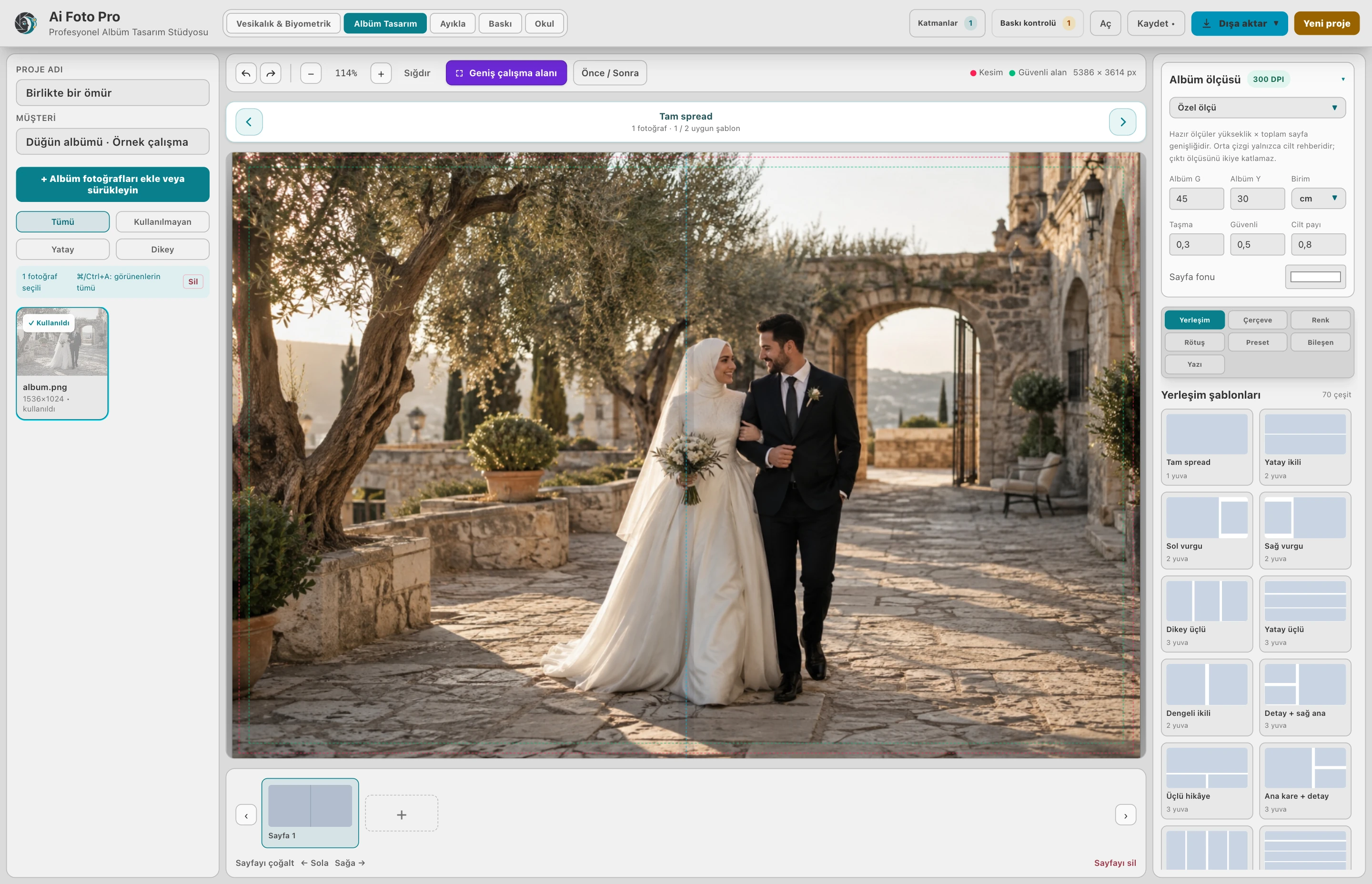
Create the work according to the size of your album. See skin center, bleed, and safe area guides during design. Predict post-printing losses by keeping faces and text away from important cutting areas. Clarify your printing house's measurement and allowance demands at the beginning of the project.
You can get started quickly with a ready-made template or place the photos yourself in the empty workspace. Cropping and position changes are made within the frame while preserving photo proportions. Arrange areas independently to balance a large group shot and a close-up portrait on the same page.
Add a name, date or a short note. Choose the font style and size; place them in front of or behind the images. Create the simple or intense design language your customer wants within the same project. You can reopen your saved project for next editing.
Review low resolution or gutter warnings before output. Once the pages are complete, export the album as a 300 DPI JPEG. Template selection and batch output reduce repetitions in multi-page jobs; final printing control still remains with the designer.
Yes. You can determine your own canvas dimensions for the album page or start from ready-made dimensions and layouts. You can arrange the photo areas according to your design.
You can pan, zoom and rotate the photo regardless of its frame. This way you can adjust the visible part of the photo while maintaining the layout on the page.
Ready-made layouts are the starting point. You can change the location and size of the areas and create a layout that suits your design. You can use the same template with different frames for different shots.
Yes. You can add text and adjust its font, size and position on the page. You can edit text along with photos as part of the design.
By previewing the pages, you can evaluate photo framing, page borders and print controls. Match the output size to the size required by the printer.
Evaluate the right workflow for your studio based on your own photos and output needs.