
Magnetic alignment to edge, center, photo and page guides; proportional sizing and free rotation from all corners.
FOR PHOTO STUDIOS • MACOS + WINDOWS
The production center of your photography studio.
Speed up repetitive work and complete more client deliveries with the same team and computer. Manage the entire studio flow, from biometric production to album design to extracting client selections, in one desktop application.
Current version 0.17.31 Five-module workspace, photo extraction by code, original resolution album streaming, 300 DPI output and in-app updating.
Try every mode without watermarks for 72 hours from your first successful sign-in. Each mode has its own output allowance. You can still open and edit your work after the trial; license the relevant mode for further output.
Source resolution is preserved
Local photo processing
Online license verification
since 2008studio experience
10+ templatescountry and document size
4+ papers10×15, 13×18, 15×21 or custom
1 clicksmart framing and angle
IDENTIFICATION & BIOMETRIC
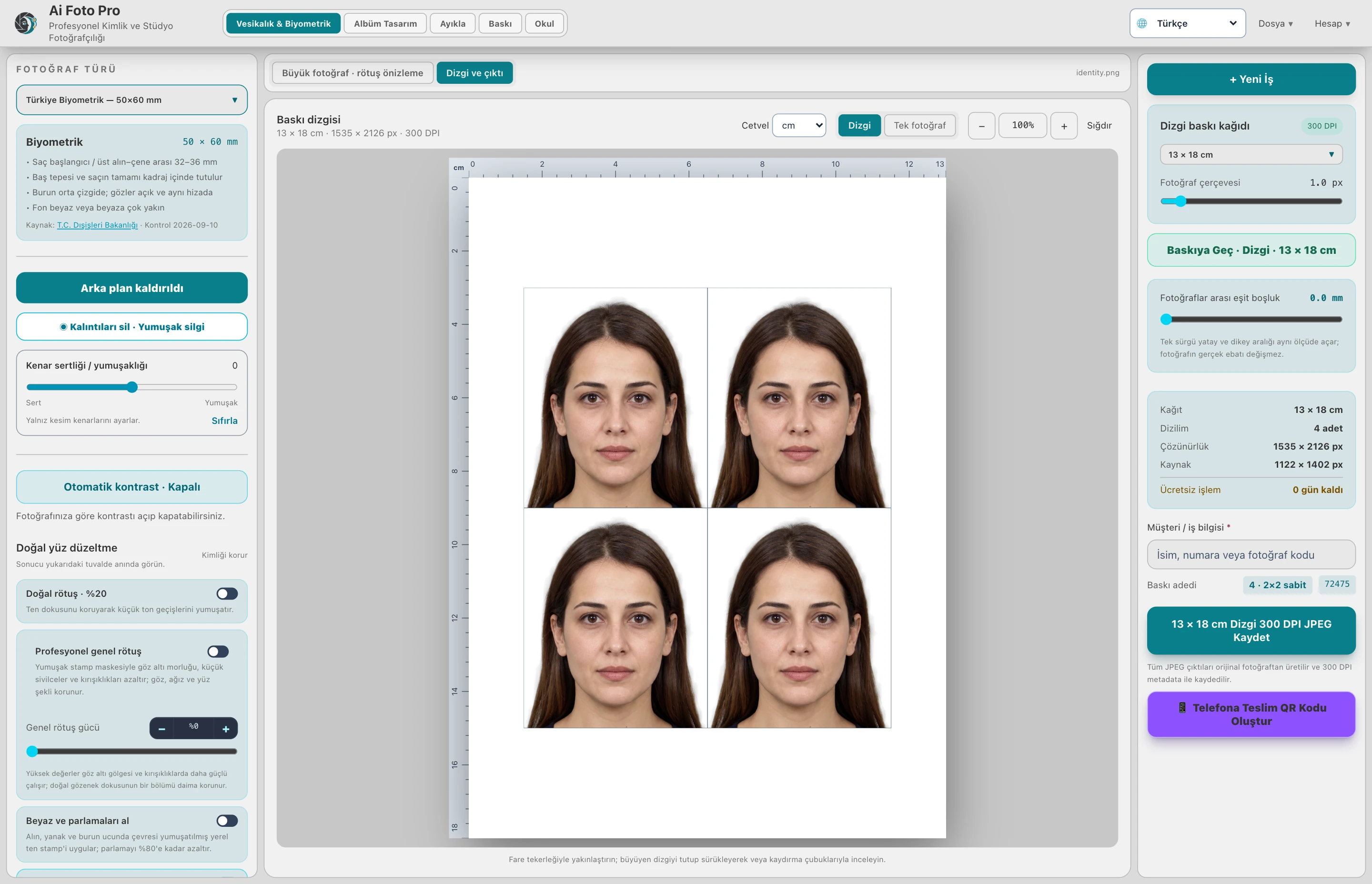
Official measurement, natural result and printing print layout are on the same screen.
Choose from Türkiye biometric, passport and country-specific visa templates. Prepare the face alignment and framing without distorting the photo ratio; save the result as a single photo, full resolution, or four on the printing paper of your choice.
- 300 DPI and source pixel preserving output
- Background, angle, framing and quality control
- Studio logo and reusable business information
ALBUM PRO • PROFESSIONAL PAGE DESIGN
Fully controlled album workflow, from photo to print.
Get up to speed with a ready-made template or work on a Photoshop-like freehand canvas. Drag photos, change layer order live, see skin line and print alerts as you design.
30+ layouts200+ components
108 font styles with Turkish character supportPreset collections
Live print controlAutomatic project registration
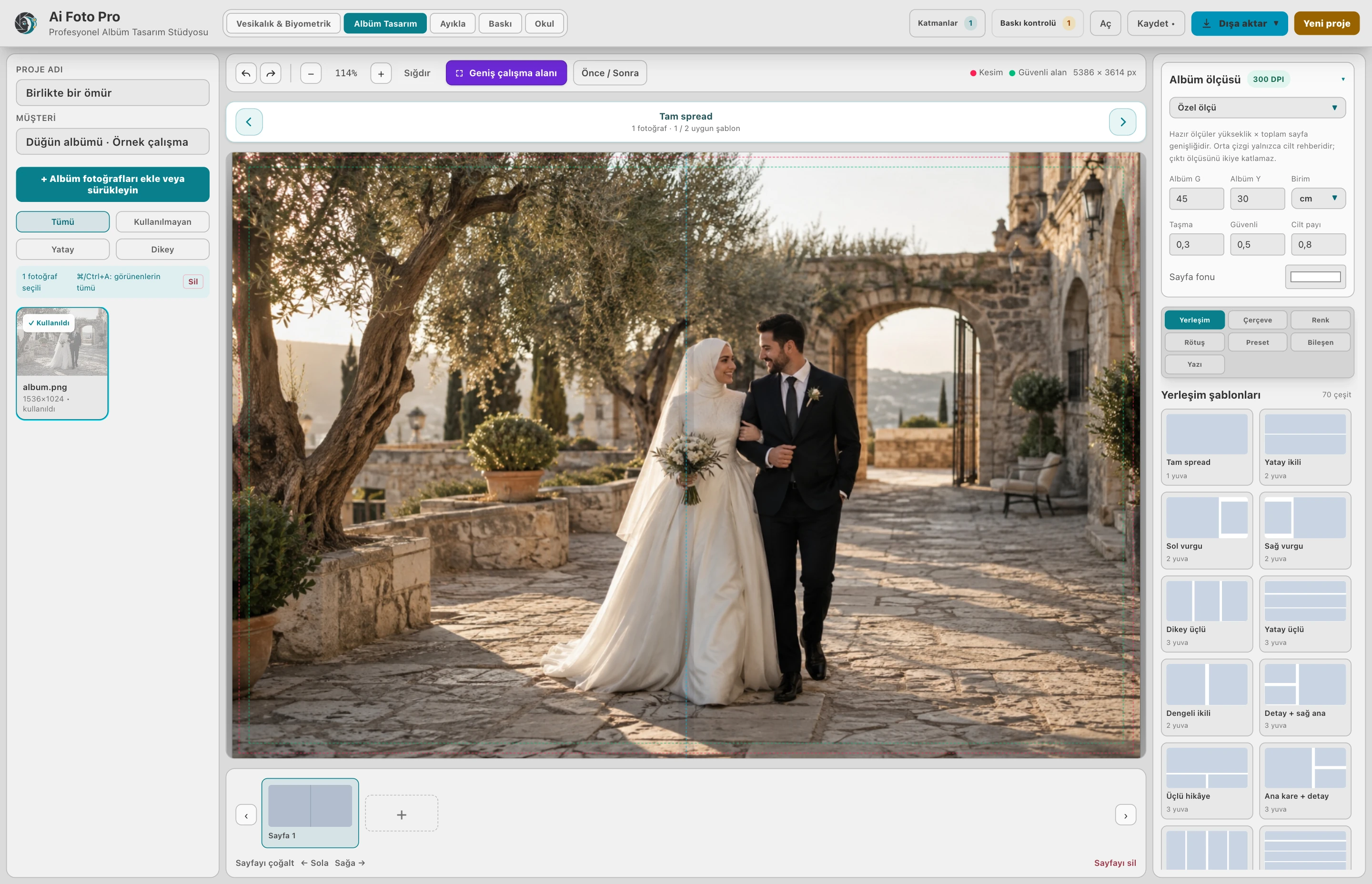
Exposure, tone curve, HSL, texture, sharpness and defog. Each preset is always calculated from the original photo.
Live drag-and-drop layer panel, colorable high-resolution components and professional font styles with Turkish characters.
Automatic recovery, unsaved changes warning, opening where you left off, and 300 DPI export of the entire album.
Photo Selection
Find customer selections in seconds instead of searching one by one.
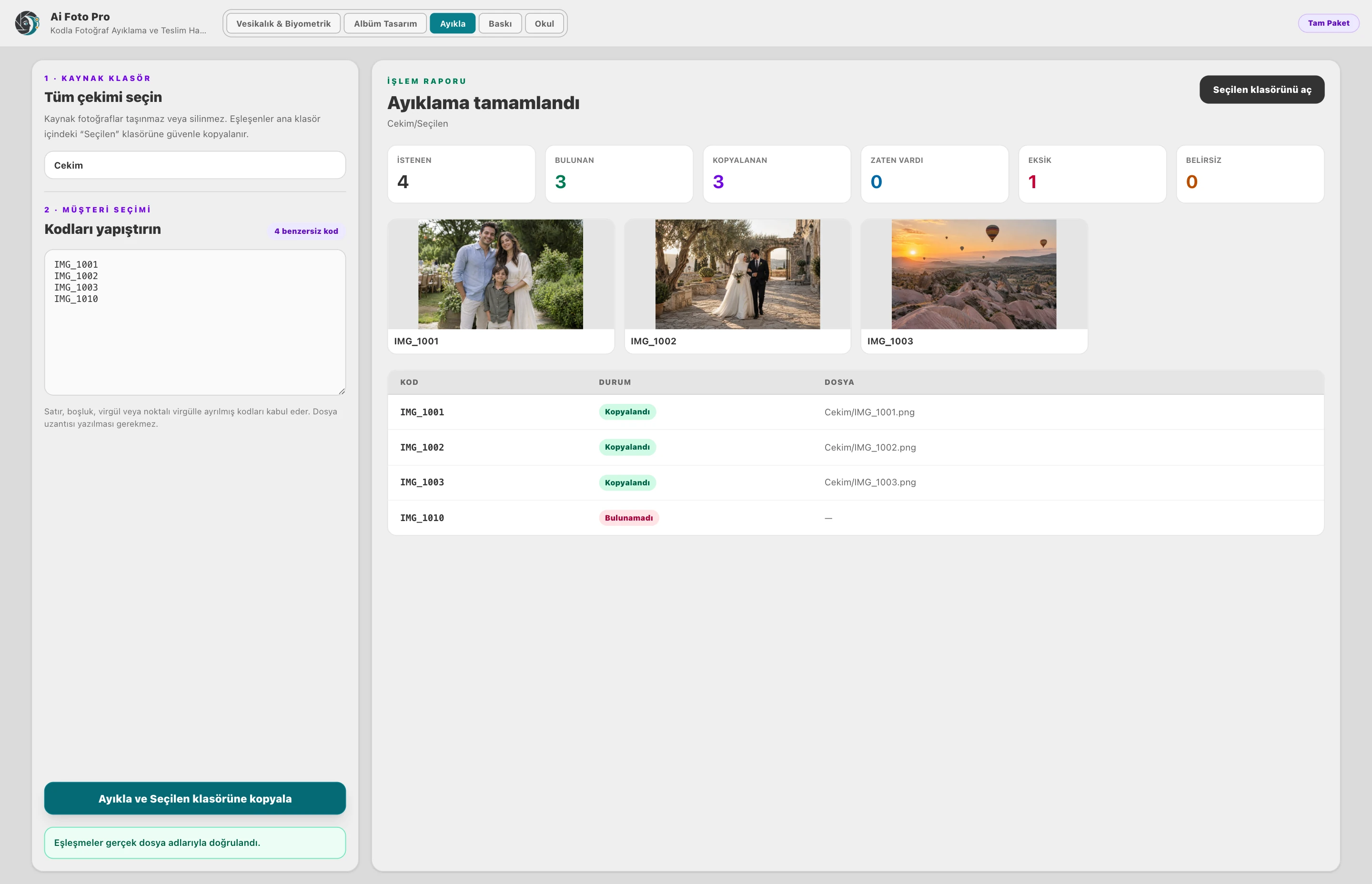
Paste the codes sent by the customer, with or without extensions. Ai Foto Pro scans the main shooting folder, copies matching photos to the “Selected” folder without touching the source files; it shows missing and ambiguous codes with a clear report.
- Support for lines, spaces, commas and semicolons
- Found, copied, already exists and missing report
- Opening the prepared folder with one click
Printing
Adjust it on the screen, prepare it for printing with the same framing.
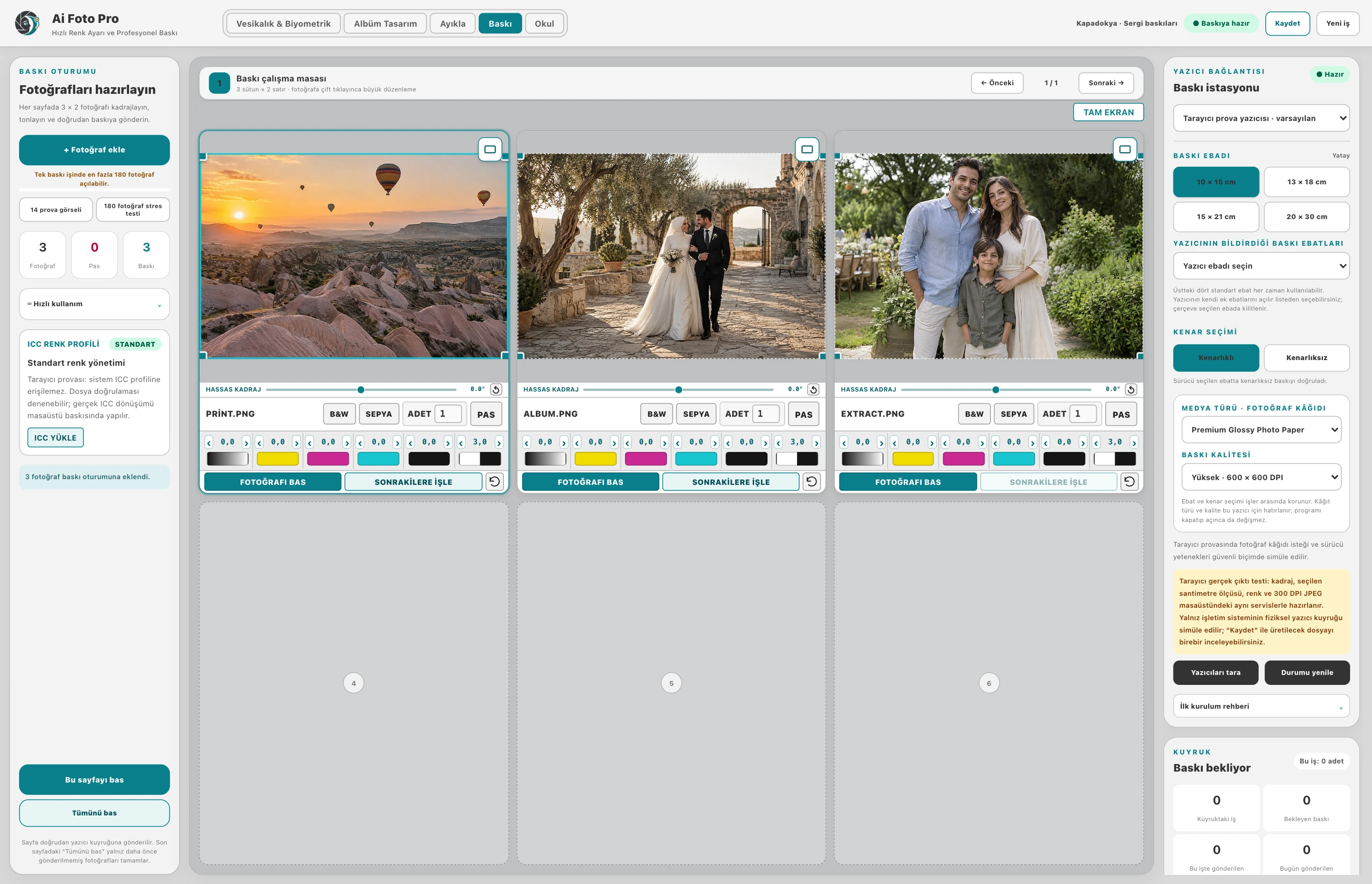
Group photos by job. Preview light, color, precise angle and horizontal/vertical framing; send the area you choose to print without changing its proportions. Track the prints sent by job and day.
- Vibrant color and light preview
- Horizontal/vertical cropping and precise angle
- Print queue and job-by-job registration
SCHOOL · FROM PHOTO TO ALBUM
An entire school’s photos. One organized delivery.
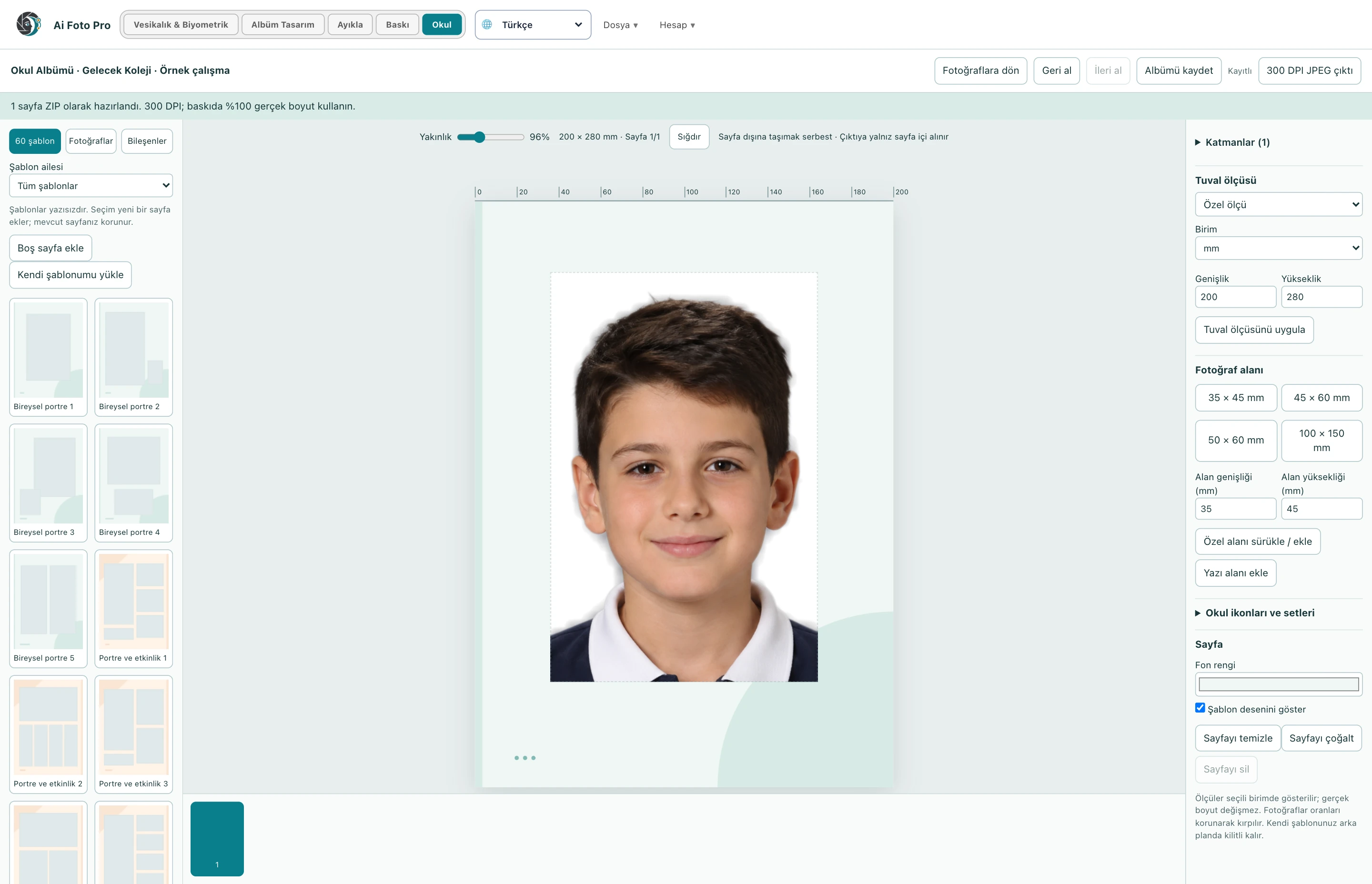
Import mixed photos or class folders after shooting. Match the student list, clear the background in bulk; apply the light to the person only. Prepare pages for each student in the School Album workspace.
- CSV student list, class and shooting selection
- 60 no-text album templates, 540 design elements
- Your own PNG icons, 108 font styles and 300 DPI output
Fluent preview, full source output
The run preview adapts to the hardware; the export uses the exact pixels of the original photo.
License verified from server
Paid output authorization is verified on the server by account, hardware, and active package. Local file modification does not extend the license period.
Update from within the app
The signed package is checked at startup or in the Account → Help menu; with your approval, it is downloaded, installed and Ai Foto Pro is restarted.
DESIGNED FOR STUDIO WORKFLOW
Upload the photo. See availability. Get the print.
Each feature is constrained to maintain one's natural and distinctive facial features while enhancing the daily studio pace.
Automatic sizing and alignment
It detects facial points, corrects camera tilt, and places head height according to the selected image template.
See details →Natural, professional retouching
With adjustable power, it softens acne, temporary scars, under-eye shadows and wrinkles with adjacent skin tissue; protects pores and facial identity.
See details →Intelligent glare correction
Compensates white areas caused by flash by comparing them to the surrounding skin tone within the face.
See details →Quality warnings
It gives clear pre-print alerts for eyes, mouth, face orientation, light, shadow and basic sharpness.
See details →Print layouts with your studio logo
Upload your own logo; the real photo should be placed neatly under each frame without distorting its size.
See details →QR digital delivery
Your customer can download a single photo to his phone with a QR code. Delivery connections are timed and controlled.
See details →Intelligent sharpening
Reinforces true image details without shifting color and skin tone; does not magnify sensor noise on flat skin areas.
See details →Full resolution 300DPI
The source photo is not reduced during operation. In addition to the standard metered output, a 300 DPI JPEG is captured, which preserves the camera pixels.
See details →Flowing studio workspace
The interactive preview runs separately and cached, while the full resolution source is preserved in the output. The left adjustment panel slides independently; the photo remains fixed on the screen.
See details →Before/after and extensive background set
Compare the result with the original with one click; choose from light, pastel, tonal and blur backgrounds for your headshots or use your own set.
See details →Special paper and frame
Select custom paper in 10×15, 13×18, 15×21 cm or cm/inch/pixel; adjust photo frame thickness and quantity according to printing.
See details →Secure in-app update
Signed updates are checked at startup and in the Account → Help menu; with user approval, it is downloaded from within the application, installed and the application is restarted.
See details →Studio shooting and free measurement
Use the photo with its own background without forcing the face frame; determine single photo size in cm, inches or pixels with 300 DPI accuracy.
See details →Professional retouching that preserves texture
Edge saver recombines low frequency correction with natural high frequency texture; eye, lip, face shape and pore appearance are preserved. The interface does not freeze because the process runs in the background.
See details →Professional Album Design
Prepare wedding and event albums freely with the Album Design module; see vertical volume center, bleed and safe area during design. Photos are dragged, cropped and layered without losing proportion.
See details →Template, preflight and batch album output
Use ready-made spread templates that adapt to horizontal and vertical photography or place them freely. Export the entire album at once as a true 300 DPI JPEG after low resolution and gutter warnings.
See details →Automatic photo extraction with code
Paste the photo codes the customer sent. Ai Foto Pro scans the main shot, copies the matches to the “Selected” folder without touching the sources; detailed reports of missing and multiple matching codes.
See details →HAZIR IN THREE STEPS
Automate repetitive work, you make the final decision.
-
1
Select template
Türkiye, Schengen, USA, Canada, China, India or studio size.
-
2
Upload photo
Background, face alignment, angle and quality control are prepared on your device.
-
3
Get the output
Save a single photo at full size, 13×18 arrayed, or as a full resolution 300 DPI JPEG preserving source pixels.
B
Photos stay in your studio.
Background removal and face analysis work offline on the desktop app. There is no need for the cloud for photo processing other than licensing and optional QR delivery.
- Local AI models
- macOS Keychain / Windows Credential Manager
- License based on hardware ID
Adjust clothing colour while retaining detail
Explore black, grey, navy and other colours in the portrait workspace. Adjust clothing and headscarf colour, and zoom in to inspect collar and shoulder edges. Refine selected areas manually with the precise boundary tool. Photo processing takes place on your computer, and output is prepared from the original-resolution image.
3-day watermark-free trial
Download, open your account, try all the modes.
The 72-hour trial has no watermarks. ID Photos: 3 exports; Album: 3 pages in total; Sort: 3 jobs; Print: 10 photos in total; School: 3 student outputs; School Album: 3 pages. Your work is preserved when time or allowances run out; license the relevant mode for further output.
apple computers
macOS 12 and above • Universal package
Download for Mac · Intel and Apple Siliconwindows computers
Windows 10/11 • 64 bit
Required Windows components are included in the installation package.
Download for Windows x64INSTALLATION AND UPDATE GUIDE
New installation or updating existing version.
You can install the new version over the existing installation as the same Ai Foto Pro ID and app name are retained. Do not uninstall the application; just close Ai Foto Pro before updating.
Safe upgrade for existing users
Account login, hardware license, registered studio logo, background sets and application settings are stored separately from the installation file. This data is not deleted during normal installation.
Install or update with DMG
- If Ai Foto Pro is open, close it completely.
- Open the DMG file and drag Ai Foto Pro to Applications.
- If the current version is detected, confirm “Change”.
If you see a security warning on a test package that is not signed with an Apple Developer ID, check the “Open Anyway” option for Ai Foto Pro once in System Settings → Privacy and Security. This step does not appear when the commercial package is notarized.
Install or update via EXE
- If Ai Foto Pro is open, close it completely.
- Run the EXE installer you downloaded.
- Complete the installation with the same user and installation location.
If SmartScreen appears in an unsigned test suite, check the filename with “More information” and use the “Run anyway” option. The installer will automatically upgrade the existing Ai Foto Pro version.
Download the installation package from the Windows or Mac link above. After installation, register within the application. Existing users can continue the update by logging in with the same account.
AS MANY MODULES AS YOU NEED, TRANSPARENT PRICE
Five modes. One license tailored to your studio.
Start with one mode, choose a double, triple or quad pack depending on your needs. Use the Full Pack for all five modes. Sales are annual only.
5 standalone mode31 package option+ VAT is appliedAnnual license
Single modes
BASIC PRODUCTION
ID & Biometric
For studios that deliver IDs, passports, visas and daily passports.
- Country and document dimensions
- Natural retouching, background and framing
- Single photo and print sheet
- Full resolution 300 DPI output
STUDIO DESIGN
Album Design
Independent design module for teams that design wedding, event and studio photos as albums.
- Free and templated album canvas
- Color, preset, component, text and layers
- Overflow, safe area and gutter controls
- Project recording and batch 300 DPI album output
FAST DELIVERY
Extract
For teams that find the photo codes chosen by the customer in seconds and prepare them for the delivery folder.
- Matching by filename and camera number
- Duplicate and missing code warnings
- Secure copying without touching the source photo
- Selected folder and result summary
PRINT STATION
For studios that manage photo framing, color schemes, and the actual Windows print queue in one workspace.
- 10×15, 13×18, 15×21 and 20×30cm
- Ratio locked crop, color and quantity settings
- Printer, paper and ICC management
- Tail recovery, report and reprint
SCHOOL PHOTOGRAPHY
School
For studios that prepare student photos in bulk, deliver them by class and design school albums.
- Bulk background removal and light adjustment
- Student matching and class deliveries
- Independent School Album workspace
- 60 templates, 540 components and 300 DPI output
double packs
10 combinations · 2 modes together2 MODES · ONE LICENSE
ID & Biometric Photos + Album Design
2 MODES · ONE LICENSE
ID & Biometric Photos + Photo Selection
2 MODES · ONE LICENSE
ID & Biometric Photos + Printing
2 MODES · ONE LICENSE
ID & Biometric Photos + School
2 MODES · ONE LICENSE
Album Design + Extract
2 MODES · ONE LICENSE
Album Design + Print
2 MODES · ONE LICENSE
Album Design + School
2 MODES · ONE LICENSE
Extract + Print
2 MODES · ONE LICENSE
Extract + School
2 MODES · ONE LICENSE
Print + School
Triple packs
10 combinations · 3 modes together3 MODES · ONE LICENSE
ID & Biometric Photos + Album Design + Photo Selection
3 MODES · ONE LICENSE
ID & Biometric Photos + Album Design + Printing
3 MODES · ONE LICENSE
ID & Biometric Photos + Album Design + School
3 MODES · ONE LICENSE
ID & Biometric Photos + Photo Selection + Printing
3 MODES · ONE LICENSE
ID & Biometric Photos + Photo Selection + School
3 MODES · ONE LICENSE
ID & Biometric Photos + Printing + School
3 MODES · ONE LICENSE
Album Design + Extract + Print
3 MODES · ONE LICENSE
Album Design + Extract + School
3 MODES · ONE LICENSE
Album Design + Print + School
3 MODES · ONE LICENSE
Extract + Print + School
Packs of four
5 combinations · 4 modes together4 MODES · ONE LICENSE
ID & Biometric Photos + Album Design + Photo Selection + Printing
4 MODES · ONE LICENSE
ID & Biometric Photos + Album Design + Photo Selection + School
4 MODES · ONE LICENSE
ID & Biometric Photos + Album Design + Printing + School
4 MODES · ONE LICENSE
ID & Biometric Photos + Photo Selection + Printing + School
4 MODES · ONE LICENSE
Album Design + Extract + Print + School
ALL FIVE MODES
Complete PackageStudio and school work under one license.
Passport & Biometric, Album Design, Sort, Print and School. From casual shooting to school scrapbooks, here are the five workspaces you need.
- ID & Biometric
- Album Design
- Extract
- School Photos & School Albums
Single account 1, 2 or 3 computers Windows and Mac
Try all five modes for 3 days without watermarks
VAT is added to all displayed prices. You can choose simultaneous use on 1, 2 or 3 computers with a single license. Windows and Mac can be used together.
LICENSE FOR YOUR STUDIO
Switch to uninterrupted production after the trial.
Your license is connected to devices based on the 1, 2 or 3 computer rights purchased. When the end date approaches, automatic notification will be sent to your registered e-mail address.
- Passport & Biometric: biometrics, passport, visa, retouching and unlimited local printing
- Album Design: free page, smart template, photo editing and batch album output
- Extract: automatic photo finding from customer codes and preparation of a secure delivery folder
- Printing: crop, color, printer queue and physical output workstation
- Any, two, three, four or all five modes can be assigned to a single license
PROFESSIONAL PHOTO STUDIO SOFTWARE
Manage biometric photo production in a single workflow.
Biometric photo program
Calculates face height, eye line, head space, and framing based on the selected document template. The photograph is not stretched; the aspect ratio is preserved and the angle is corrected in a controlled manner.
Preparing passport and visa photographs
More natural and distant framing for headshots; offers country-specific millimeter measurements for Schengen, US and other visa applications. Single photographs or 10×15, 13×18, 15×21 and custom-sized print types can be purchased.
300DPI studio output
Archivable JPEG printouts are prepared with client name and transaction code, studio logo and cut margins. The macOS and Windows desktop application is designed for daily production.
FREQUENTLY ASKED QUESTIONS
Frequently asked questions about Ai Foto Pro.
Does Ai Foto Pro work without internet?
Photo processing, background removal and facial analysis work offline on the device. Internet required for account login, active license check, paid print authorization, and optional QR delivery.
What biometric and visa photo measurements does it support?
Türkiye biometric, passport, Schengen, USA, Canada, China, India and other common country-visa templates in the app are supported. Germany, Japan, South Korea, Australia, New Zealand and Brazil options are listed with their official measurements.
How long is the Pro license valid?
Your license is valid for one year from the date of purchase. You can use it with the same account on 1, 2 or 3 computers you purchase.
In which package is the Album Design module opened?
Album Design is a standalone mode. You can license it alone or combine it with any of the Passport & Biometric, Extract, Print and School modes in the same license.
How are Extract and Print modules licensed?
Extract and Print are two independent modes. Each can be licensed alone or in combination with other modes. Extract finds the codes sent by the customer in the main shooting folder and copies them to the “Selected” folder. Print; it manages photo framing, color scheme, printer queue and output jobs on a single screen.
Can I move the license to another computer?
The license works with 1, 2 or 3 selected computers. In case of hardware change, the support team can reset the device lock from the management panel.
How does the free trial work?
The 72-hour trial has no watermarks. ID Photos: 3 exports; Album: 3 pages in total; Sort: 3 jobs; Print: 10 photos in total; School: 3 student outputs; School Album: 3 pages. Your work is preserved when time or allowances run out; license the relevant mode for further output.
Can I install the new version over the existing Ai Foto Pro?
Yes. First, turn off Ai Foto Pro. Run the new EXE installer on Windows; on macOS, drag the application in the DMG to the Applications folder and use the “Change” option. You don't need to uninstall the app beforehand; your account, license and locale settings are preserved.
How does in-app updating work?
The latest version is notified in the app. If you are using one of the last three versions, you can postpone the update; for older versions, updating is mandatory. You can also download the current installer from this page.
PHOTO STUDIO GUIDES
Find the right answer for your workflow.
Explore step-by-step guides to sizing, retouching, Photoshop, albums, school photos and printing.
Explore all guides →PRODUCT GUIDES
Explore the features that fit your work.
In each guide, you can find the usage steps, the advantages it will bring to your studio, and the points to pay attention to during the final check.
ID & Biometric
Prepare the delivery expected by the customer for ID, passport and visa withdrawals in a single work area.
Album Design
Turn wedding, engagement and event photos into printable album pages.
Extract
Do not search for the photos chosen by the customer one by one among hundreds of files.
See how the photo will fit on the paper before sending it to print.
School
Get started even without a class list.
School Album
Bring student portraits, classroom photos, and your school's visual identity together on the same page.
Student lists and batch photo renaming
Don't stop your work to make the list fit the photo.
Natural portrait retouching
Create a clean, balanced portrait of your client that looks like himself.
Face positioning and precise cropping
Even if the photo's measurement is correct, the face may be too large, small, or close to the edge.
Background removal and portrait backgrounds
Remove the messy shooting backdrop, choose a background that suits the client's needs, and examine the portrait to its final delivery size.
QR photo delivery to phones
Offer your customer the opportunity to download a single ready-made photo from his phone.
300 DPI photos and print layouts
Manage the photo's physical size, pixel size and printing paper together.
Portrait glare correction and lighting balance
Balance out harsh highlights created by the flash on the forehead, nose, or cheek in a controlled manner.
Photo quality warnings and final checks
Evaluate details that may be overlooked during busy work before printing.
Natural detail and sharpening controls
Increase clarity of real detail without hardening the image.
ID photo layouts with your studio logo
Let your studio's identity appear on the print type you deliver.
Custom paper, borders and output sizes
Don't try to fit everything on a single piece of paper.
Custom-size studio photography
Not every photo has to be cropped to a face pattern.
Album templates, text and visual elements
Create your own design without having to start with a blank page.
Local photo processing and project safety
Prepare client photos in desktop workflow.
A five-mode workflow for photo studios
From selecting a customer to delivering a school album, different jobs require different tools.
Annual licenses and module packages
Start with the modes you need.
Download Ai Foto Pro for Windows and Mac
Evaluate the five modes with your own photos.
Installation, updates and getting started
Know the steps from initial installation to upgrade.
Ai Foto Pro: frequently asked questions
Find out what you need to know before deciding on trial, annual license, school photos, print and digital delivery.